
Sorry These Products Have Been Discontinued
We no longer provide these systems. Kintronics provides the latest technology that can improve your safety and security. Our product line changes as new technology become available. Please take a look at the other network-attached security systems we have available. These include IP camera systems, door access control systems, and network-attached paging systems.
Please take a look at all the other products we sell that make your world safer. We also provide optical jukebox libraries that can be used to archive all your data.
The following information is included for reference only.
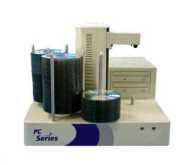
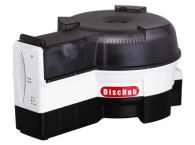
These archiving systems provide different ways to archive your data. The simplest solution archives your data to DVD discs on a spindle. This automated system includes an automated robotic mechanism to move the discs from the input spindle to the output spindle. The hierarchical archiving system not only archives the data automatically to an output spindle, it also provides an easy to use index and recovery procedure for all your data. The DiscHub Workgroup is a 100-disc jukebox or library that not only archives the data, but also makes it easy to retrieve without manual intervention.
The following models were available:
This simple system archives your data to DVD discs on a spindle. Creates an off-line set of discs.
This automated hierarchical system provides an easy to use index and recovery procedure for all your data. Creates an off-line set of discs.
DiscHub 100-disc Jukebox for writing and retrieving your data. Provides near-line access to your data.
Email Archiving Appliance. Transferred email to optical disc.
Overview:
The ArcPoint includes PoINT Archiver software which is a Windows Server application providing a secure and cost effective process to identify, monitor and archive relevant data in a network. It works with leading Disc Publishing systems to provide a central “console” from which you can manage the archival of data throughout the network. Archiver periodically monitors network folders and copies or moves files to removable optical media according to Administrator defined filters. Additionally, criteria can be defined to identify and archive multiple versions of the same named file.
Archive and Compliance
Point Archiver provides the security and authenticity of information which is required to fulfill the constantly rising number of compliance regulations. Archive jobs monitor existing data folders and files. An intuitive Wizard interface provides step by step procedures which allow the administrator to specify:
- Name for the Archive
- Media type and Target Device
- Data source folders, files & extensions
- Archiving conditions
- Migration Rules
Monitoring and Migration
Based upon Archiving Conditions files within the monitored Data Source folders are copied or moved to the Archive Volume. Conditions include size, time, hash value and attribute changes.
Automated Disc Publishing
Based upon Migration rules each Archive is automatically written to a CD, DVD or BD Disc and labeled. A complete database of all Archive Volumes is maintained, and all folders, files and versions are viewable. All media are produced using a standardized file system (udf) assuring the accuracy and recoverability of the data.
Search and Retrieve
Individual files, directories or complete archives can be searched and copied back to hard disk. Point Archiver’s “Directory Tree” displays the structure of the archived data in a view similar to the Windows Explorer. The file information (e.g. name, size, date) and the name of the corresponding archive medium can be queried for each stored file version. Using the Retrieval Module, a Point Archiver database query identifies and generates a list of all necessary media and instructs the user to place these onto the publishing system. The requested files are automatically copied into the selected target directory, which can be the original location or any specified directory location.
Data Security
During the migration process, all significant information is stored in a database. Point Archiver can check the integrity of archived files and verify if a medium or file was manipulated. This assures the trustworthiness of the archive and its documents. In order to recognize possible manipulations of the archived data, digital fingerprints of the files as well as of the complete medium are encoded and stored on the media itself and also in the database. Thus any individual archive medium can be examined for consistency and compared with the database records. Additionally, the files in the origin folder can be compared with the database or with the archived files. Documents which have been deleted or changed are identified and reported to the administrator. An optional encryption module provides protection from unauthorized access.
Supported File systems, UDF 1.5, 2.5
Optical Technologies
- CD-R, DVD-R, Blu-Ray Disc
- CD/DVD/BD Publishing Systems
- Primera
- Rimage
The list of supported devices is extended on a continuous basis