
Blu-Ray Optical Libraries and Jukeboxes
Kintronics has a wide selection of optical BluRay jukeboxes and libraries available, as well as all the software or network attached storage manager necessary to attach them to your computer and network. They range in size from 35 to over 600 discs capacity. The Blu-ray Jukeboxes also support DVD media. If you need to just archive to disc and have infrequent access, take a look at our Archiving Appliance. BluRay archiving systems provide the latest technology for assuring your data is there when you need it.
To help you select the correct product, take a look at the application note below, and our technical articles, but don’t hesitate to contact us for personalized technical assistance
Archiving to the Cloud
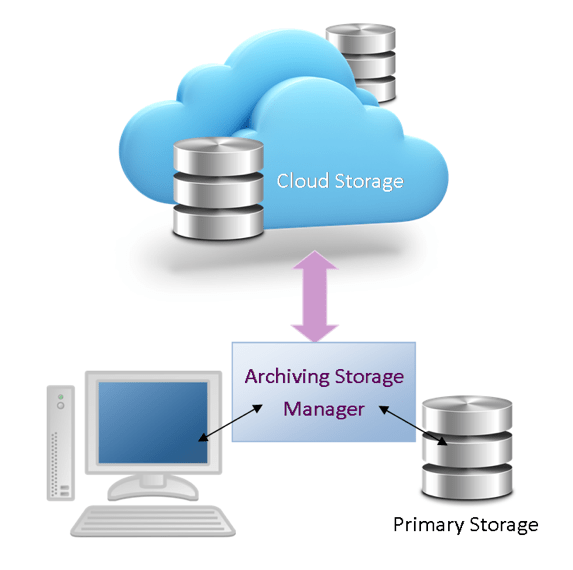
The alternative to optical jukebox and libraries is cloud based archiving systems. This system uses Archiving Software – Automated File Tiering and Archiving to Hosted Cloud Services.
Archiving Cloud Manager provides a file based bridge to any cloud storage system, such as Amazon S3 or Cloud Data management interface (CDMI) compatible cloud service using a Windows NAS Appliance.
It’s easy to Incorporate our Archiving Storage Manager (ASM) software. It can be integrated into any existing storage infrastructure. This makes the advantages of hosted cloud storage useable without a need for costly changes and adaptations to existing infrastructure
The software performs policy-based file tiering and archiving from primary storage systems to any compatible hosted cloud storage service and keeps all data transparently accessible from links created at the original location.
To learn more about Cloud Archiving take a look at our article, Cloud Archiving Systems.
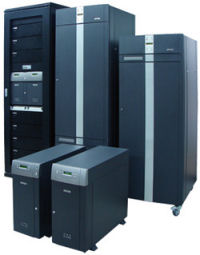
Optical Libraries and Jukeboxes
The first optical libraries used large WORM (Write Once Read Many) discs. These 12-inch discs didn’t hold too much data (about 650K Bytes), but they were the first disc to be called archival since the data was predicted to be available for over 50 years. Write Once discs have the benefit of preventing data from being changed. Similar capability is provided by using modified hard drives. HDWrite1X technology protects your computer from malware.
The latest discs are called blu-ray type discs because they use the blue laser to read and write the data. Today the discs can hold up 100G Bytes and next year are expected to double to 200 GB. Here is a summary of the libraries available.
Archiving Libraries – Optical Libraries and Jukeboxes
Disc Library
Capacity: From 45 to 690 discs depending on number of drives with Blu-ray media.
Description: This complete family of optical jukebox libraries provides a range of flexible libraries with 45 to 690 Blu-ray discs. Total capacity varies depending on the number of drives required.
HIT-Storage
Capacity: Disc capacity from 35 to 560 discs. Supports 100GB /128GB Blu-ray media.
Description: This new jukebox library system uses the latest multi-function drive supporting CD, DVD Blu-ray discs. Select up to 8 drives, with capacity not affected by the number of drives. It features removable 35-disc magazines with built-in RFID tags providing easy off-line storage retrieval…
Features
Jukeboxes or Libraries from Kintronics provide secure data storage management that meets compliance regulations such as Financial (SEC, Sarbanes-Oxley), Medical (HIPAA, DICOM, PACS), Government (DOD), Legal Admissibility (ISO-18501 and 18509) and many others.
Did you Know that Blu-ray is Green?
Since Blu-ray optical storage uses less power and less cooling it is a much greener technology than hard drives. I guess you can say; save your data, save the world.
Optical Library and Jukebox Application Note:
This application note compares the jukebox, Archiving Appliances, CD Towers and Turbo Servers.
Note the term jukebox and library are sometimes used interchangeably. We usually use the term jukebox when we are talking about devices that handle DVD and CD discs. The term Library is usually used when the device handles optical media such as UDO or Blu-ray optical media. Today the most popular media uses the Blu-ray technology.
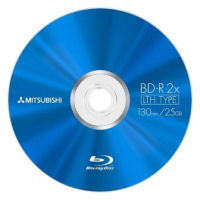
A jukebox or optical library is excellent for archiving data to optical discs. Optical media has evolved over the years. Optical media includes DVD, UDO, MO and Bluray discs. Today Blu-ray is the most popular optical disc media because it is also used in consumer video. If you have a library with any of the older media, contact us for help in migrating to the latest media. The current Blu-ray discs hold up to 100GB/disc, and the new 200GB discs are becoming available.
Most of the optical libraries contain multifunction writers that support a variety of formats such as DVD, CD and Blu-ray, etc. If the drives support Bluray media they don’t usually support the UDO media. They hold from 100 to over 600 discs. You can select WORM (Write Once Read Mostly) or rewriteable media.
Jukeboxes connect to a Windows, UNIX or Linux server using special software. Users on the network can copy or drag and drop data to the server which automatically transfers the data to an optical disc in the jukebox.
All the jukeboxes work best when only a few users need to access the discs at the same time. Small jukeboxes have only one or two optical drives, so only one or two users can share the jukebox at the same time. If additional users want to use a new disc, they have to wait for the disc to be swapped by the robotics in the jukebox. This takes from 4 to 9 seconds. Larger jukeboxes have six or more readers, so more users can simultaneously access the different discs at the same time.
Archiving Appliances
There are a number of systems that take advantage of the same robotic mechanisms used in automatic duplicators. With these systems you can archive email data, medical images or general data to a stack of discs. This is a batch process where a set of blank discs are placed on a spindle and written one-at-a-time and placed on an output spindle. The discs are stored off-line and can be accessed by reading them back in using the same mechanism. Learn more…
Speeding up Access to your Data
If you need to speed up access to the data in the jukebox you can cache some data to your computer’s hard drive, RAID or use Network Attached Storage. The jukebox management software makes use of this cache storage to dramatically improve access time.
Control and Interface Software from PoINT
Point Software connects many different jukebox systems to Windows servers. Optical recording is integrated to fulfill all archiving, mastering and duplication requirements. The automated recording feature simplifies the overall recording process dramatically. Due to its multi-threaded implementation PoINT Jukebox Manager allows multiple users to access the jukebox simultaneously and to record different data streams to different media in parallel. Disc caching to hard disk improves performance dramatically.
Discontinued Libraries and Jukeboxes
For reference only: The following jukeboxes and libraries are discontinued or no longer available from Kintronics.
- Powerfile
- JVC
- Nakamichi
- Kubic
- Pioneer
- Plasmon
Resources
The following resources can be used to help you understand the technology. Contact us for help with your system. Our engineers will make sure you get the exact system you need.
Technical and Application Articles
Review of the Current Optical Jukebox and Library Technology
Blu-ray wins the standards war and becomes the technology of choice.
How to handle all the Information that needs to be Archived
How to Meet the requirements of the Sarbanes-Oxley Act
How Blu-ray optical discs work
You may know about Blu-ray discs which are used for holding high quality movies, but do you know how they are used by computers for holding lots of data.
If you would like to receive our technical newsletter, just fill out the form.
Our Technical Notes newsletter is filled with articles about how the technology works and examples of how it is used. It also includes some great technical jokes and cartoons.
Our blog describes how the technology works, includes educational notes, describes how to do your own calculations, and how to select the right equipment. We also included examples about how the technology is used.
These videos provide an overview of the technology. Take a look at our latest video describing the IP camera system components and setting objectives.
Technical Support
Optical jukebox and library systems can be complex because they include many different components that have to work together. Kintronics is a resource for engineering and integration of all your security projects. We can design your complete system so don’t hesitate to contact us for assistance.
After purchasing your system we make sure that it works exactly the way you expect. You can contact us for help with your installation and any technical support you may need.
We provide technical support and warranty support. Contact us at 1-800-431-1658 or 914-944-3425 whenever you need assistance